|
Happy Wednesday everyone,
This one's packed. I'm breaking down which AI tool to actually use for which task, walking you through how Claude can now redesign entire rooms like an interior designer, sharing a design tool that genuinely blew me away, and answering all the questions I've been getting about Gemini.
Let's get into it.
|
IN THIS EMAIL
» Which AI tool to use for which task
» Claude just killed interior designers
» Tool of the week: Kittl
» My full thoughts on Gemini
» From the DMs: Am I too late to start using AI?
|
🎥 VIDEO YOU MIGHT HAVE MISSED
Which AI Tool to Use for Which Task
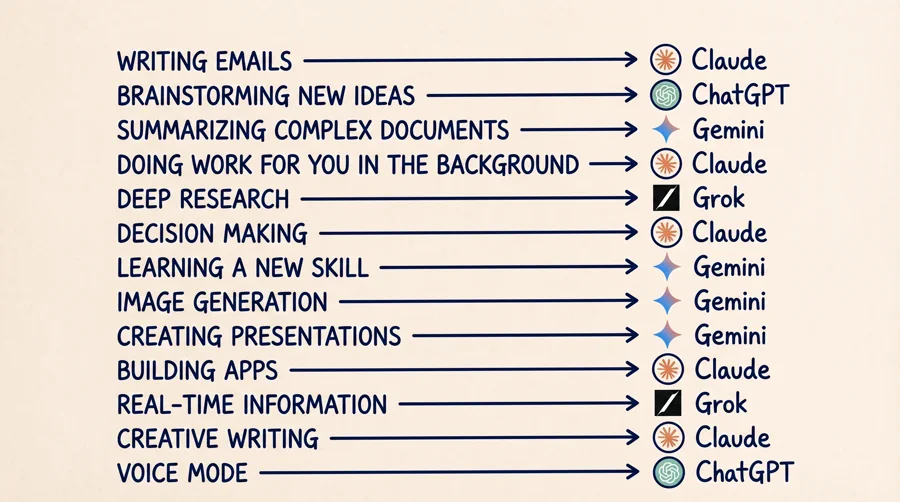
I put up a quick rundown recently that broke down exactly which AI tool I go to for each type of task. A lot of people still think ChatGPT is the only one they need. That's just not true anymore. Each of these tools has gotten really good at specific things and knowing which one to use can save you hours of time.
Here's the cheat sheet:
Writing emails → Claude
Brainstorming new ideas → ChatGPT
Summarizing complex documents → Gemini
Doing work for you in the background → Claude
Deep research → Grok
Decision making → Claude
Learning a new skill → Gemini
Image generation → Gemini
Creating presentations → Gemini
Building apps → Claude
Real-time information → Grok
Creative writing → Claude
Voice mode → ChatGPT
Save this list. Test the ones you haven't tried. You're going to be blown away by how much better your outputs get when you're using the right tool for the right job.
Watch the full video on Instagram →
🧠 DEEP DIVE
Claude Just Killed Interior Designers
You can now redesign entire rooms without hiring an expensive interior designer using Claude Code. This one is actually insane. You just upload a photo of any room in your house and Claude will give you stunning, professional-level redesigns that actually look good. You can change the furniture, the colors, the layout, whatever you want.
Here's how to set it up in three easy steps:
Step 1: Google "banana skill Claude" and click the first link. Copy the URL. Open Claude, choose Code, paste the link in, and say "install this skill."
Step 2: Head over to Google AI Studio and click API keys. Create an API key, copy it, paste it back into Claude and say "set this up."
Step 3: Upload an image of your room, type /banana, and say "redesign this room like a professional interior designer."
That's it. Claude will generate full redesigns in seconds. You can keep iterating and asking for different styles, different furniture, different vibes, until you get something you love. It's honestly wild how good the results are.
Watch the full walkthrough on Instagram →
Prefer to read it? Download the full PDF guide here →
🛠 MAVERICK'S TOOL OF THE WEEK
Kittl
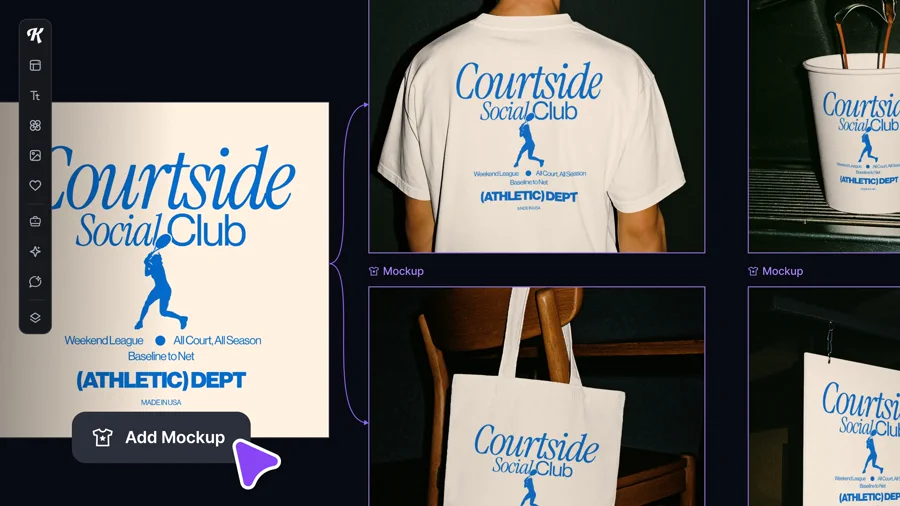
This week I wanted to bring back a tool I made a video on about two months ago called Kittl. I still refer people to it all the time, especially if you're doing any sort of print design, merchandise design, or branding work. It's that good.
The mockups and designs this thing can create using AI are genuinely insane. I'm talking t-shirts, posters, logos, packaging, full brand systems. The quality is way above what I've seen from most AI design tools out there.
It also has this whiteboard feature that I really love. You can just drag stuff around, play with ideas, and iterate on concepts without having to deal with the usual clunky design software. The interface is super smooth and it just feels good to use, which matters more than people give it credit for.
If you're a creator, small business owner, or anyone who needs to make designs without hiring a designer, this one is worth checking out.
Check out Kittl →
📚 FROM THE RESOURCE HUB
My Full Thoughts on Gemini
A lot of people ask me about Gemini (Google's AI model), so I wanted to share what I actually think about it.
Short answer: it's a great tool. I don't use it as much as I use ChatGPT and Claude, but I still pay $20 a month for the premium version because there are a few things it does better than anyone else.
Its biggest moat right now is Nano Banana (their image generation model) and how deeply integrated it is with every other Google product you already use. If you live inside Gmail, Docs, Drive, or Sheets, Gemini just slots right into your workflow.
Where it really stands out:
Summarizing complex documents. Hands down the best at this.
Learning a new skill. They also have a tool called NotebookLM which is genuinely insane for learning anything new.
Image generation. Nano Banana is arguably the best image model in the game right now.
Presentations. Because of Nano Banana, the visuals it generates for slides are on a different level.
Long-context work. You can feed it massive documents or entire codebases and it actually holds the full picture without losing the plot.
If you want the full breakdown, I put together a complete guide on my resource hub that walks through everything Gemini can do and how to get the most out of it.
Read the Complete Gemini Guide →
💬 FROM THE DMS
"Am I Too Late to Start Using AI?"
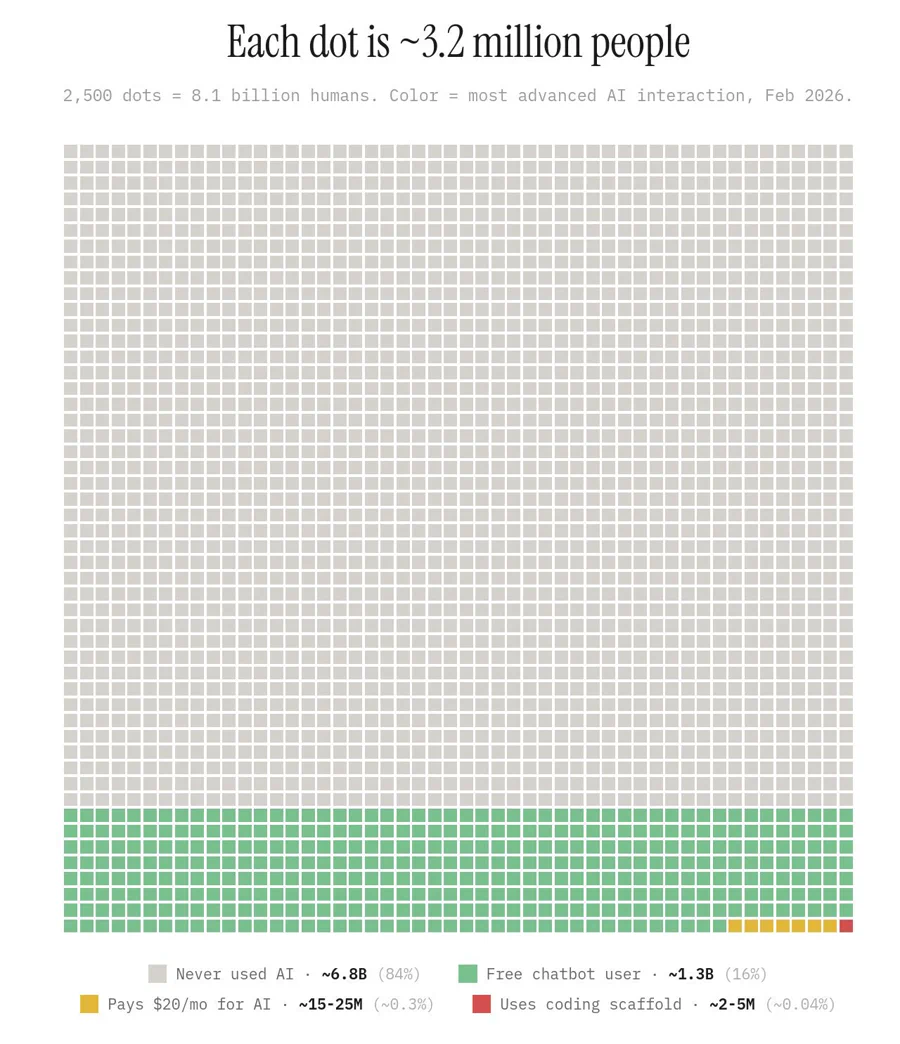
I get this one all the time and the answer is no. Not even close. Take a look at the visual above for a second. Each dot is about 3.2 million people and it represents every human on Earth as of February 2026, colored by how advanced their AI usage is.
The grey dots? That's 6.8 billion people who have never used AI. That's 84% of the planet. The green dots are people using free chatbots here and there, about 1.3 billion of us. The small yellow sliver is the 15 to 25 million people actually paying $20 a month for AI. That's just 0.3% of humans on Earth.
If you're reading this newsletter, you're already in the top 16% of humans when it comes to AI. If you pay for ChatGPT or Claude, you're in the top 0.3%. Let that sink in.
The mistake most beginners make is trying to learn everything at once. They see me or other creators post about five different tools a week and they get overwhelmed and just don't start. Don't do that. Pick one tool, one use case, and just use it.
Here's the easiest way to start: take one thing you do every day that you don't like doing. Writing emails, summarizing meetings, researching stuff, drafting reports, whatever. Ask ChatGPT to help you with it for a week straight. You'll get hooked, and from there the rest is easy.
You're not behind. You're actually getting in at a really good time. The tools finally work well enough that the learning curve is almost nothing, and there's more content out there to help you than ever before.
See you Sunday.
Maverick
P.S. If you're a business owner looking to actually implement AI into your workflows, my team and I work with a small number of people and businesses to build custom AI systems, automations, and tools. If that sounds like you, apply here.
P.P.S. If you're new here or you ever skip one, I've got a newsletter archive of all my past emails you can catch up on anytime.
|